A todo tool where the writing is done by an AI, not me
中文版:知识库之外,还缺一层
I wrote a command-line tool called worklog (wl). These days most of my recording, planning, summarizing and reviewing happens in it.
It's a little different from a normal todo tool: the one writing into it day to day isn't me, it's an AI.
I do most of my work in a terminal, talking to an AI. What to do today — I have it lay the tasks out. Progress, decisions, things that come up mid-task — it jots them down as we go. When something's finished, it marks it done. In the evening I have it write up the day. When I come back to something days later, I look it up there too. The whole loop — record, plan, do, summarize, review — is the AI writing into wl while it works, not me filling in a form after the fact. I usually just glance at the terminal to check it got things right.

How it's used: a day, recorded by the AI
Take today. In the morning the AI looks over my plan and pulls the tasks into the day:
# what's scheduled today, and where it stands
wl day
# schedule task 42 for today
wl sched 42 today
While working, it records as it goes:
wl add "fix upload timeout" --para task --parent 42 --log "suspect the retry logic"
wl log 618 "found it: hardcoded retry interval, switching to exponential backoff"
wl link 618 "[[upload-timeout-notes]]"
wl done 618 --at 14:30 --log "deployed; timeout alerts gone"
Each is a single line, composable — create a task, append progress, link the debugging notes, close it with the outcome, one thing per command.
Something you'll need to do later, but not now, often comes up mid-task. Have it capture the task and schedule it for tomorrow, so it doesn't get lost:
wl add "add rate limiting to downloader" --para task --parent 42 --sched tomorrowAt the end of the day, the AI writes up a summary:
wl recapWhen I come back to something later, or a fresh AI session takes over cold, one command pulls the whole history back:
# this task's ancestors and children
wl focus 618
# keyword full-text search
wl find timeout
# semantic search by meaning, catches phrasings keywords miss
wl query "upload timeout"
Almost everything I do lives in it now — work and personal. Even worklog's own development runs on it: 100+ tasks, no GitHub Issues. In a bit over a month it's a thousand-plus nodes, all in one local SQLite file, queries in milliseconds.
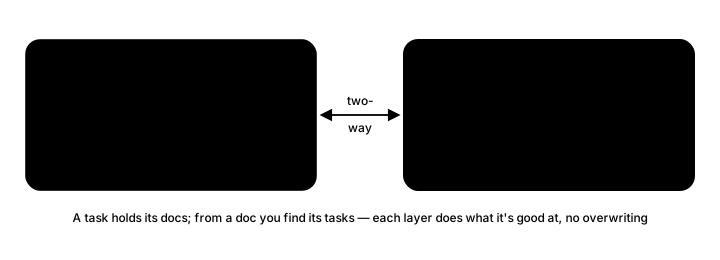
Tasks also link both ways with my Obsidian notes: a task holds its documents, and from a document you can find the tasks that reference it. Structured state lives in wl; long-form writing stays in Obsidian; each keeps to what it's good at.
That's what it is and how it's used. Here's why I built it.
Why a knowledge base alone isn't enough
The "second brain" idea has been popular for a few years. I'm no exception — I use Obsidian and Notion to keep the things I've thought through and want to hold on to for a long time.
What I found is that a knowledge base alone isn't enough. It's good for settled conclusions, but the things actually in motion right now — what to do today, how far a task has gotten, a decision just made, something I suddenly remember to defer — it can't hold those. I never had a good tool for that part. Before, I either made do with Markdown, or left it scattered across my head and chat logs.
I'd tried a few todo tools earlier, but the payoff never matched the effort. Before things get complicated enough to really need one, just feeding the tool fields every day becomes the burden.
AI changed that. I no longer fill things in one by one — I let the AI drop the details of work and life into Markdown as we talk. What used to sit in my head landed in files.
Here's roughly how it piled up:
| Month | Lines | Size |
|---|---|---|
| 2025-11 | 269 | 10 KB |
| 2025-12 | 331 | 18 KB |
| 2026-01 | 567 | 40 KB |
| 2026-02 | 1,027 | 89 KB |
| 2026-03 | 2,381 | 294 KB |
| 2026-04 | 2,487 | 409 KB |
| 2026-05 | 1,743 | 537 KB |
Seven months, the size grew more than fiftyfold. It worked well at first, and then the problems showed up.
Why Markdown falls short for tracking process
Two or three months in, the problems came one after another. Using a knowledge tool (Markdown files) to manage what's in motion was a poor fit to begin with:
- Several AI windows write into one file at once. The copy an AI is holding goes stale fast: the change it generates against the old content often won't apply to a file another window has already edited, so it has to re-read and redo it. These collisions are frequent, and the retries waste compute and time.
- The file keeps growing. To change one line, the AI has to read the file in and locate that line — the read cost keeps climbing.
- Relations between tasks, meetings and decisions can only be
[[wikilinks]]. Once there are enough of them, renaming one document breaks a swath of them. - Reviewing a week means having the AI read all the related files and re-derive it — slow, and easy to miss things.
By the end of May I did the math: the time spent tending the Markdown — getting the AI to parse it, avoiding write conflicts, fixing broken links — had passed the time the AI was saving me.
The reason is simple enough. A knowledge base and a record of process are two different jobs. A knowledge base wants long-form text, stable structure, long-term storage; a record of process wants frequent writes, quick lookups, and several windows writing at once without fighting. Markdown suits the first, not the second.
Two layers: a knowledge base, and a structured quick context beside it
Once that was clear, I stopped expecting one tool to do everything and split it into two layers.
One layer is the knowledge base, for the long-term things — conclusions I've thought through, references I've organized. Obsidian keeps doing this, and does it well.
The other records what's in motion right now — today's plan, the task in hand, a passing idea. It wants frequent writes and quick lookups; the volume is small, but every read and write has to be light.
Put it this way: if the knowledge base is my second brain, the other half I was missing is a structured quick context sitting next to it — small in size, quick to read and write, holding the part I need often right now. Most people already have the second-brain layer; this structured quick context layer is either empty or faked with Markdown. That's the layer I set out to fill.
The user is an AI, so the whole design changes
Once I decided to build it, I quickly saw I couldn't just take an existing todo or checklist tool, because they're all built for people.
The key thing, I think, is that the premise is reversed. Existing tools are designed for humans, aimed at making it easy for a person to fill in — a nice UI, fewer clicks. My case is the other way around: the one operating this tool day to day is an AI, and I only look at the results.
Change the user from a human to an AI, and the whole design has to follow:
- Commands are short, one line each. An AI calls them in a terminal, and a command that finishes a thing in one line is the least error-prone — no interaction, no step-by-step prompts.
- Output is plain text, and cheap on tokens. What reads the results is an AI; it doesn't need a pretty interface, it needs compact, directly parseable text.
- No preset categories. Projects, tasks, habits, meetings, a stray idea — all the same kind of node, joined into a tree by
parent_id. The AI doesn't have to learn a project / label / priority scheme first; it just creates a node and hangs it where it belongs. This is the biggest difference from tools like Todoist and Notion. - The structure has to be clear and connected — this part matters a lot. Each record can be rich on its own, but pulling up a single node costs very few tokens; when you need more, following the parent/child links makes it easy to recover the full context and see the whole picture. A local slice stays cheap to read, and the whole picture is always one expansion away. Having both at once is exactly what the structure buys you.
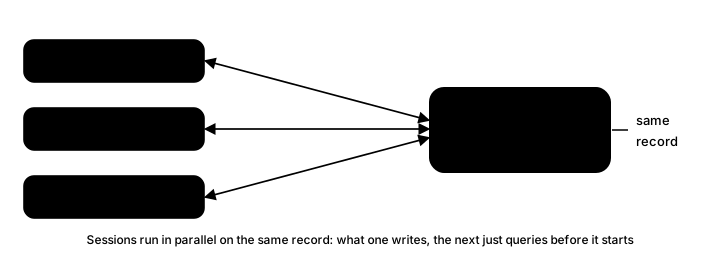
- SQLite underneath. Several AI sessions writing at once don't overwrite each other; the data is transparent, readable by people and by the AI, and both sides see the same thing.
- Relations live in the database, not in filenames, so renaming a title doesn't break them.
In short, it isn't another todo tool — it's a layer of record redesigned around "an AI uses it."
The biggest change: context stops leaking
I often run several AI sessions in parallel. That's fast, but there's several times more to keep track of, and my attention keeps switching. Switching is where the details get lost: a lead I was halfway through chasing, a decision just made in passing, something I meant to defer. If it isn't written down right then, it's gone once I switch away. None of these look important, but that's often exactly where problems come from later.
With this layer, those things get written down as they happen, and one command brings them back when needed. Whether I come back days later or a fresh AI session takes over, the context is still there — no rebuilding from scratch. When several windows are working together, they're looking at the same record.
How good an AI's answers are depends a lot on whether the context you give it is complete. With the context sitting somewhere reliable, this whole thing gets much smoother.
Getting started
worklog is open source, the command is wl, MIT.
pip install pyworklog
wl init
Once it's installed, tell your AI about it in your config (Claude Code's CLAUDE.md, say, or a skill) — what wl is and when to record what — and it'll keep the record for you while it works. See the README for how.
(worklog and worklog-cli were both taken on PyPI, so the package is pyworklog; the command is still wl.)
This is the first post in a series. Later ones open up each piece I passed over here: what a CLI designed for AI looks like, how one table holds everything from today to a lifetime, how several AI sessions share the same context, how I use it day to day, and how it splits work with Obsidian.
If you've got a knowledge base and you're getting real work done with AI, this missing layer is worth a try.